


The cost to develop a GetYourGuide clone usually ranges between $45,000 and $250,000+, depending on the activity marketplace features, supplier dashboard, booking flow, payment gateway, mobile app requirements, ticketing system, admin controls, API integrations, and customization level. A basic tour and activity booking website can be developed at a lower cost, while a full-scale GetYourGuide-like marketplace with suppliers, instant booking, attraction tickets, QR vouchers, reviews, multi-currency, multi-language support, mobile apps, and advanced analytics requires a higher investment.
GetYourGuide is a popular travel experience booking platform that allows users to discover and book tours, attractions, activities, guided experiences, museum tickets, day trips, adventure activities, and local experiences. It helps travelers book things to do before or during their trip.
That is why many travel startups, DMCs, tour operators, destination management companies, OTAs, tourism boards, and travel technology businesses want to develop a GetYourGuide clone.
A GetYourGuide clone is not a direct copy of GetYourGuide. It is a custom-built tour and activity booking platform inspired by GetYourGuide’s business model, marketplace structure, supplier onboarding flow, activity listing experience, and booking journey. The platform can be developed for B2C travelers, B2B agents, local suppliers, destination partners, or a hybrid travel marketplace model.
For businesses, developing a GetYourGuide-like platform can create strong revenue opportunities because activities and experiences are high-margin travel products. Unlike flights, where margins are often limited, tours and attractions can generate better commissions, direct supplier partnerships, featured listings, and package add-ons.
In this guide, we will explain how to develop a GetYourGuide clone, including its features, cost, tech stack, APIs, business model, monetization options, development timeline, and major factors that affect the final activity booking platform development cost.
What Is a GetYourGuide Clone?
A GetYourGuide clone is an online marketplace where travelers can search, compare, book, pay, and manage tours, activities, attraction tickets, and travel experiences.
The platform connects customers with local activity suppliers, tour guides, attraction operators, museums, theme parks, adventure providers, and destination companies.
A GetYourGuide clone can include:
Tour booking
Activity booking
Attraction tickets
Museum tickets
Theme park tickets
Guided tours
Day trips
Adventure activities
Local experiences
Private tours
Group tours
Instant booking
QR code vouchers
Supplier dashboard
Admin dashboard
Reviews and ratings
Payment gateway
Cancellation and refund
Mobile app
Multi-currency support
Multi-language support
The main goal of GetYourGuide clone development is to create a marketplace where travelers can easily find and book things to do at their destination.
The platform can work as a B2C activity booking app, destination experience marketplace, DMC booking platform, local tour marketplace, OTA add-on module, or white-label activity booking system.
A custom GetYourGuide clone gives you control over supplier onboarding, commission rules, activity categories, booking flow, cancellation policy, payment system, voucher format, user experience, and business expansion.
Why Develop a GetYourGuide Clone?
Travelers do not only book flights and hotels. Once the main trip is planned, they search for things to do at the destination.
This includes city tours, desert safaris, museum tickets, sightseeing passes, adventure activities, food tours, cultural experiences, private guides, day trips, and local attractions.
A GetYourGuide-like platform helps travelers discover and book these experiences from one place.
For businesses, this creates a strong opportunity because the activity booking market is highly fragmented. Many local suppliers still manage bookings manually through phone calls, WhatsApp, social media, or offline agents.
By building an activity booking platform, you can bring these suppliers online and generate revenue through commissions, markups, service fees, supplier subscriptions, featured listings, and destination promotions.
A GetYourGuide clone can also be added to an existing OTA platform. If your business already sells flights and hotels, adding activities can increase average booking value and improve customer retention.
It also has strong SEO potential. Destination activity pages, “things to do” pages, attraction pages, city tour pages, and experience guides can bring high-intent organic traffic.
GetYourGuide Clone Business Models
Before developing a GetYourGuide clone, you need to decide the business model. This affects platform features, supplier controls, payment flow, admin panel, and development cost.
B2C Activity Booking Marketplace
In a B2C model, travelers directly search and book tours and activities from your website or mobile app.
This model is suitable for startups, OTAs, travel agencies, DMCs, and destination platforms.
It requires user login, activity search, listing pages, booking flow, payment gateway, vouchers, reviews, cancellation, refunds, and customer support.
Supplier Marketplace Model
In this model, activity suppliers register on your platform and add their own tours, availability, pricing, and booking rules.
This model is suitable if you want to build a marketplace with many local suppliers.
It requires supplier onboarding, supplier approval, listing management, availability management, commission rules, booking dashboard, and settlement reports.
DMC Activity Platform
A DMC can use a GetYourGuide-like platform to sell destination-based activities and experiences.
This model can include tours, transfers, attraction tickets, local guides, sightseeing, excursions, and packages.
The platform can be used for direct customers, agents, and corporate groups.
B2B Agent Activity Portal
In a B2B model, travel agents log in and book tours and activities for their customers.
This model requires agent login, wallet, credit limit, agent markup, commission management, invoices, vouchers, reports, and sub-agent management.
White-Label Activity Booking System
A white-label model allows other travel agencies, DMCs, hotels, tourism boards, or OTAs to use your activity booking system under their own branding.
This creates B2B revenue through setup fees, subscriptions, commissions, or revenue sharing.
Niche Experience Marketplace
You can also build a GetYourGuide clone for a specific niche.
For example, adventure tours, food experiences, luxury experiences, religious tours, eco-tourism, museum tickets, cultural tours, or private local guides.
A niche platform can be easier to market and scale in the beginning.
Core Features of a GetYourGuide Clone
A GetYourGuide clone should make activity discovery and booking simple.
The platform should help users find relevant experiences, compare options, understand inclusions, check availability, book instantly, and receive vouchers.
User Panel Features
User Registration and Login
Users should be able to register using email, mobile number, OTP, Google login, Apple login, or social login.
The platform can allow users to browse activities without login, but login is useful for bookings, saved activities, reviews, vouchers, and personalized recommendations.
The user profile should include personal details, saved travelers, booking history, vouchers, wishlist, reviews, wallet balance, payment methods, currency, language, and communication preferences.
Activity Search
Activity search is the core feature of a GetYourGuide clone.
Users should be able to search experiences by destination, date, category, keyword, price range, group size, duration, and activity type.
The search should support cities, landmarks, attractions, regions, countries, and nearby locations.
For example, users can search:
Things to do in Dubai
Desert safari in Dubai
Paris museum tickets
Food tours in Rome
Bali adventure activities
London walking tours
A strong search experience improves conversion.
Category-Based Browsing
Activities should be organized into clear categories.
Common categories include:
Sightseeing tours
Attraction tickets
Museum tickets
Adventure activities
Food and drink
Cultural experiences
Day trips
Walking tours
Private tours
Theme parks
Water activities
Wildlife tours
Religious tours
Airport transfers
Local guides
Category-based browsing helps users discover experiences even when they do not know exactly what they want.
Destination Pages
Destination pages are important for activity booking platforms.
Each destination page should show top activities, popular attractions, recommended tours, best-selling experiences, travel tips, categories, reviews, and FAQs.
Destination pages also help with SEO.
Activity Listing Page
The activity listing page should show relevant activity cards.
Each card should include activity image, title, rating, review count, duration, price, cancellation option, instant confirmation, category, and short description.
The listing page should be clean and comparison-friendly.
Activity Detail Page
The activity detail page is where users make the booking decision.
It should include:
Activity title
Images and gallery
Description
Highlights
Inclusions
Exclusions
Duration
Meeting point
Availability
Price
Group size
Guide language
Cancellation policy
Important information
Itinerary
Reviews
FAQs
Supplier details
Booking options
The page should clearly explain what the user is buying.
Availability Calendar
Users should be able to check available dates and time slots.
The availability calendar should show available dates, sold-out dates, seasonal schedules, departure times, and remaining seats where applicable.
For activities with limited capacity, live availability is important.
Time Slot Selection
Many tours and attractions have different time slots.
Users should be able to select a date, time, ticket type, adult count, child count, infant count, or group size.
The system should update pricing based on selection.
Instant Booking
Instant booking allows users to book and receive confirmation immediately.
This improves conversion because users do not want to wait for manual confirmation.
However, some custom tours may require request-based booking.
The platform should support both instant confirmation and request-to-book models.
Request-Based Booking
For private tours, group tours, custom experiences, and premium activities, users may need to send an inquiry first.
The supplier or admin can then confirm availability and pricing.
This feature is useful for high-value and customized experiences.
Ticket and Voucher Generation
After booking, the system should generate a ticket or voucher.
The voucher can include booking ID, QR code, customer name, activity name, date, time, meeting point, supplier contact, inclusions, cancellation policy, and instructions.
Vouchers should be available through email, SMS, WhatsApp, and user dashboard.
QR Code Tickets
QR code tickets help suppliers verify bookings at the activity location.
The supplier can scan or enter the booking ID to validate the voucher.
This is useful for attractions, museums, tours, theme parks, and events.
Filters and Sorting
Filters help users find the right activity faster.
Common filters include:
Price
Duration
Rating
Category
Free cancellation
Instant confirmation
Private tour
Group tour
Language
Pickup included
Accessibility
Start time
Activity type
Suitable for families
Adventure level
Sorting options can include recommended, best rated, lowest price, highest price, most popular, newest, and shortest duration.
Reviews and Ratings
Reviews are very important for activity booking.
Users should be able to read verified reviews before booking.
After completing an activity, users can leave ratings, comments, photos, and experience feedback.
Admin should be able to moderate reviews.
Wishlist
Users should be able to save activities to a wishlist.
This helps users compare options and return later.
Wishlist data can also be used for remarketing and personalized offers.
Booking Flow
The booking flow should be simple.
Users should select activity, date, time slot, ticket type, number of participants, add-ons, pickup option, traveler details, coupon, payment method, and confirm booking.
The checkout page should clearly show final price, taxes, fees, cancellation policy, and supplier terms.
Online Payment
A GetYourGuide clone should support secure online payments.
Common payment options include credit card, debit card, UPI, net banking, wallets, PayPal, Stripe, Razorpay, Apple Pay, Google Pay, and local payment gateways.
For international platforms, multi-currency support is important.
Booking Management
Users should be able to manage all bookings from their account.
They should be able to view upcoming activities, completed bookings, cancelled bookings, vouchers, invoices, refund status, and support tickets.
Cancellation and Refund
The platform should clearly display cancellation policies before booking.
Users should be able to cancel eligible bookings, request refunds, and track refund status.
Cancellation policies can vary by supplier, activity type, date, and ticket category.
Pickup and Drop-Off Details
Some activities include pickup and drop-off.
Users should be able to enter hotel name, pickup address, contact number, and special instructions.
The supplier should receive these details in the booking dashboard.
Multi-Language Support
Activities may be available in different guide languages.
The platform should allow users to filter by language and view content in their preferred language.
Multi-language support is important for international destinations.
Multi-Currency Support
Users should be able to view prices in their preferred currency.
Currency conversion should be updated regularly.
This improves the experience for international travelers.
Mobile App
A GetYourGuide clone mobile app can improve user engagement.
Users can search activities, book tickets, access vouchers, receive reminders, view meeting points, and contact support during travel.
Push Notifications
Push notifications can be used for booking confirmation, activity reminders, meeting point alerts, cancellation updates, refund status, and personalized offers.
Customer Support
Support options can include help center, chatbot, live chat, email support, ticket system, WhatsApp support, and phone support.
Support is important because travelers may need help with meeting points, timing, cancellations, and last-minute changes.
Admin Panel Features
Admin Dashboard
The admin dashboard should show total bookings, revenue, users, suppliers, activities, cancellations, refunds, pending approvals, top destinations, top activities, and support tickets.
A clear dashboard helps the business monitor daily operations.
User Management
Admin should be able to manage customers, booking history, reviews, wallet credits, support tickets, and account status.
Supplier Management
Admin should be able to approve, reject, edit, suspend, or verify suppliers.
Supplier profiles should include business details, contact person, documents, payout details, commission terms, activity listings, and performance reports.
Activity Management
Admin should be able to create, edit, approve, reject, or remove activity listings.
Admin should also be able to manage titles, descriptions, categories, images, prices, availability, cancellation rules, inclusions, exclusions, meeting points, and itinerary details.
Booking Management
Admin should be able to view and manage all bookings.
The booking panel should show booking ID, user details, supplier, activity name, date, time, participant count, payment status, confirmation status, cancellation status, refund status, and voucher details.
Availability Management
Admin should be able to manage calendars, time slots, inventory, blackout dates, seasonal schedules, and capacity limits.
This is useful for activities with fixed slots or limited availability.
Commission Management
Admin should be able to define commission rules by supplier, activity category, destination, booking amount, or contract type.
Commission management is one of the most important revenue controls for a GetYourGuide clone.
Payment Management
Admin should be able to track successful payments, failed payments, refunds, wallet credits, chargebacks, and supplier payouts.
Payment reports help with finance and reconciliation.
Supplier Payout Management
Supplier payout management helps calculate how much needs to be paid to each supplier after deducting platform commission, refunds, cancellations, and penalties.
Admin should be able to generate payout reports.
Cancellation and Refund Management
Admin should be able to review cancellation requests, check activity policies, calculate charges, approve refunds, reject invalid requests, and track refund status.
Coupon and Offer Management
Admin should be able to create and manage coupons, seasonal offers, destination discounts, first-booking offers, referral rewards, and app-only deals.
Coupons should support service restrictions, date restrictions, user restrictions, minimum booking value, and usage limits.
Review Management
Admin should be able to moderate reviews and ratings.
This helps prevent spam, fake reviews, abusive content, and irrelevant feedback.
Category Management
Admin should be able to create and manage categories such as tours, tickets, adventure, food, culture, transfers, day trips, and private experiences.
Good category structure improves browsing and SEO.
CMS Management
A CMS helps with SEO and content marketing.
Admin should be able to manage destination pages, attraction pages, blogs, FAQs, landing pages, travel guides, terms, privacy policy, cancellation policy, and promotional pages.
Reports and Analytics
Reports should include bookings, revenue, cancellations, refunds, supplier performance, destination performance, top activities, user behavior, coupon usage, payout reports, and conversion rates.
Analytics helps improve pricing, supplier quality, marketing, and operations.
Supplier Panel Features
A supplier panel is one of the most important parts of a GetYourGuide clone.
Supplier Registration
Suppliers should be able to register and submit business details.
Admin can approve suppliers before they start listing activities.
Supplier Profile
Suppliers should be able to manage company name, logo, contact details, documents, payout details, cancellation rules, and business description.
Activity Listing Management
Suppliers should be able to add and manage activity listings.
They can upload images, write descriptions, set pricing, add categories, define inclusions, exclusions, meeting points, and important instructions.
Availability and Time Slot Management
Suppliers should be able to manage available dates, time slots, capacity, blackout dates, seasonal availability, and sold-out dates.
This helps prevent overbooking.
Pricing Management
Suppliers should be able to set adult prices, child prices, group prices, private tour prices, seasonal prices, and add-on pricing.
Booking Dashboard
Suppliers should be able to view all bookings.
The dashboard should show customer details, activity date, time slot, participant count, pickup details, payment status, and voucher status.
Voucher Validation
Suppliers should be able to validate vouchers using QR code scanning or booking ID verification.
This is useful for attraction tickets and tour check-ins.
Cancellation Management
Suppliers should be able to view cancellation requests and cancellation history.
Depending on admin rules, suppliers may approve or only view cancellation updates.
Reports and Settlements
Suppliers should be able to view bookings, revenue, commission deductions, pending payouts, completed payouts, cancellations, and activity performance.
Agent Panel Features
If your GetYourGuide clone includes B2B booking, an agent panel is required.
Agent Login
Travel agents should be able to log in and book activities for their customers.
Agent Wallet
Agents can use wallet balance or credit limit to make bookings.
Agent Markup
Agents should be able to add their own markup before selling activities to customers.
Booking Reports
Agents should be able to view bookings, vouchers, invoices, cancellations, refunds, and payment history.
Sub-Agent Management
Master agents can create sub-agent accounts and manage their permissions, booking limits, and reports.
APIs Required for GetYourGuide Clone Development
A GetYourGuide clone can work with direct supplier listings, third-party activity APIs, or both.
Common API categories include:
Activity search API
Activity booking API
Attraction ticket API
Tour availability API
Ticketing API
QR voucher API
Payment gateway API
Map API
Geocoding API
Currency conversion API
Email API
SMS API
Push notification API
Review API
Analytics API
If the platform works as a marketplace, many listings can be managed directly by suppliers without third-party APIs.
If the platform wants global inventory from the beginning, activity APIs and attraction ticket APIs can be integrated.
The final API strategy depends on your destination focus, supplier network, booking model, and budget.
Advanced Features of a GetYourGuide Clone
AI-Based Activity Recommendations
AI can recommend activities based on destination, travel dates, user behavior, budget, previous bookings, and traveler type.
For example, families can see family-friendly activities, while adventure travelers can see hiking, diving, and outdoor experiences.
Dynamic Packaging
Activities can be bundled with hotels, transfers, flights, or packages.
This helps increase average booking value.
Location-Based Recommendations
The app can recommend nearby activities based on the user’s current location.
This is useful for travelers already at the destination.
Last-Minute Booking
Many travelers book activities after reaching the destination.
A last-minute booking feature can show activities available today or tomorrow.
Private Tour Customization
Users can request private tours with custom date, group size, pickup point, language, and itinerary preferences.
This is useful for premium experiences.
Supplier Quality Score
The platform can score suppliers based on reviews, cancellation rate, response time, booking volume, and customer complaints.
This helps admin manage supplier quality.
Smart Ranking
The platform can rank activities based on popularity, reviews, price, conversion rate, availability, commission, and user preference.
Affiliate and Partner System
Hotels, travel bloggers, agents, and destination websites can promote activities and earn commissions.
This can expand distribution.
White-Label Activity Platform
A white-label system allows OTAs, hotels, DMCs, and tourism businesses to sell activities under their own branding.
Mobile Guide Mode
The app can include meeting point maps, offline vouchers, guide contact, activity reminders, and trip notes.
This improves the in-destination experience.
GetYourGuide Clone Development Cost
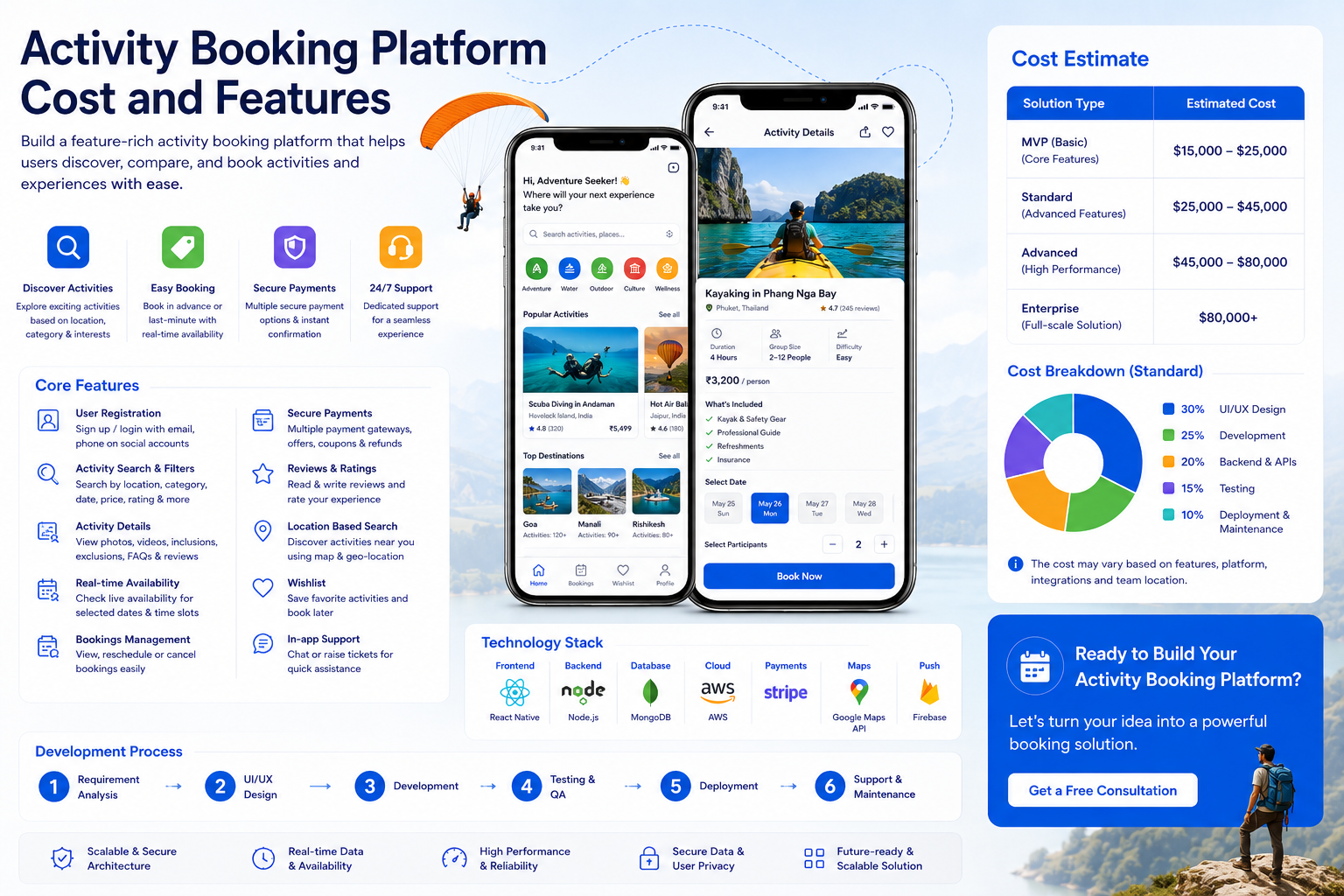
The cost to develop a GetYourGuide clone depends on platform type, marketplace features, supplier panel, booking flow, mobile apps, and customization level.
Here is an estimated cost breakdown:
| Platform Type | Estimated Cost |
| Basic Activity Booking Website | $45,000 – $75,000 |
| Activity Marketplace with Supplier Panel | $80,000 – $150,000 |
| Website + Android and iOS App | $120,000 – $200,000 |
| Full GetYourGuide-Like Platform | $160,000 – $250,000+ |
| Enterprise Experience Marketplace | $250,000 – $450,000+ |
A basic version may include activity listings, search, filters, booking, payment, vouchers, admin panel, and basic reports.
A mid-level version may include supplier dashboard, availability calendar, coupons, reviews, cancellation, refunds, CMS, and analytics.
An advanced GetYourGuide clone may include mobile apps, QR voucher validation, B2B agents, multi-currency, multi-language, AI recommendations, affiliate system, white-label support, and advanced supplier analytics.
Cost Breakdown by Feature
| Feature | Estimated Cost |
| UI/UX Design | $8,000 – $25,000 |
| Activity Search Module | $12,000 – $40,000 |
| Activity Listing Management | $15,000 – $50,000 |
| Availability Calendar | $15,000 – $45,000 |
| Booking Flow | $18,000 – $60,000 |
| Payment Gateway | $5,000 – $18,000 |
| QR Voucher System | $10,000 – $35,000 |
| Reviews and Ratings | $6,000 – $20,000 |
| Admin Panel | $18,000 – $55,000 |
| Supplier Panel | $25,000 – $75,000 |
| Agent Panel | $18,000 – $55,000 |
| Mobile App Development | $35,000 – $120,000 |
| Reports and Analytics | $8,000 – $30,000 |
The actual cost may vary based on project scope, supplier features, activity complexity, design quality, development team location, and API requirements.
Factors That Affect GetYourGuide Clone Development Cost
Marketplace Complexity
A simple activity booking website costs less than a full supplier marketplace.
If suppliers can register, add activities, manage availability, validate vouchers, and view payouts, development cost increases.
Supplier Panel Features
Supplier dashboard is a major cost factor.
The more control suppliers need, the more complex the platform becomes.
Availability and Inventory Logic
Activities can have fixed dates, recurring schedules, limited seats, private slots, seasonal timing, and blackout dates.
Managing this correctly requires strong booking logic.
Ticketing and Voucher System
QR tickets, mobile vouchers, validation tools, and ticket scanning increase development scope.
Mobile App Requirement
Mobile apps increase cost but improve voucher access, activity reminders, location-based discovery, and repeat bookings.
Multi-Currency and Multi-Language
International activity marketplaces need currency and language support.
This adds development, testing, and content management effort.
Payment and Payout Logic
Marketplace payments require supplier payouts, commissions, cancellations, refunds, and settlement reports.
This is more complex than simple payment collection.
Review and Trust System
Verified reviews, moderation, supplier quality scores, and rating logic increase platform value but add development work.
Scalability
A large activity marketplace needs scalable infrastructure, fast search, optimized media storage, and supplier management tools.
This increases initial development cost but supports growth.
Tech Stack for GetYourGuide Clone Development
The tech stack should support marketplace features, activity search, booking, payments, supplier panels, mobile apps, and scalable architecture.
| Layer | Recommended Technologies |
| Frontend | React.js, Next.js, Vue.js |
| Mobile App | Flutter, React Native, Swift, Kotlin |
| Backend | Node.js, Python, .NET, Java |
| Database | PostgreSQL, MySQL, MongoDB |
| Search Engine | Elasticsearch, Solr |
| Cache | Redis |
| Maps | Google Maps, Mapbox |
| Cloud | AWS, Azure, Google Cloud |
| Payments | Stripe, PayPal, Razorpay, Adyen |
| Notifications | Firebase, Twilio, SendGrid |
| Media Storage | AWS S3, Cloudinary |
| Analytics | GA4, Mixpanel, Amplitude, Custom BI |
The final tech stack depends on your budget, marketplace size, supplier model, traffic expectations, and long-term product roadmap.
Step-by-Step Process to Develop a GetYourGuide Clone
Step 1: Define the Business Model
Start by deciding whether the platform will be B2C, supplier marketplace, DMC platform, B2B agent portal, niche experience marketplace, or white-label system.
This decision affects features, panels, payment flow, and cost.
Step 2: Finalize Activity Categories
Define the categories you want to offer first.
For MVP, you can start with tours, attraction tickets, day trips, transfers, and local experiences.
Later, you can add adventure activities, food tours, private tours, events, and premium experiences.
Step 3: Plan Supplier Onboarding
Decide whether suppliers will add activities themselves or whether admin will manage all listings.
Supplier self-service makes the platform scalable but requires a strong supplier dashboard.
Step 4: Design UI/UX
Design pages for destination search, activity listings, activity detail pages, availability calendar, booking flow, voucher access, user dashboard, and supplier dashboard.
The design should be clean and visual because activities depend heavily on images and trust.
Step 5: Build Backend Architecture
Develop backend systems for users, suppliers, activities, availability, bookings, payments, vouchers, cancellations, refunds, reviews, commissions, payouts, and reports.
Step 6: Integrate APIs
Integrate payment gateway, maps, currency conversion, email, SMS, push notifications, analytics, and activity APIs if required.
Step 7: Develop Website and Mobile Apps
Build the customer-facing website and mobile apps.
The platform should be fast, responsive, and easy to use.
Step 8: Build Admin, Supplier, and Agent Panels
Create dashboards for admin, suppliers, agents, support, finance, and operations based on the business model.
Step 9: Test the Platform
Test activity search, availability, time slots, booking flow, payment, voucher generation, QR validation, cancellation, refund, supplier panel, mobile responsiveness, and reports.
Step 10: Launch and Optimize
After launch, monitor bookings, supplier performance, destination demand, conversion rate, cancellation rate, user reviews, and support tickets.
Continuous optimization is important for activity marketplaces.
Development Timeline
The timeline to develop a GetYourGuide clone depends on the scope.
| Development Scope | Estimated Timeline |
| Basic Activity Booking Website | 3 – 5 Months |
| Marketplace with Supplier Panel | 5 – 8 Months |
| Website + Mobile Apps | 7 – 10 Months |
| Full Activity Booking Marketplace | 9 – 14 Months |
| Enterprise Experience Platform | 14 – 20+ Months |
A phased approach is usually better.
You can launch an MVP first with activity listings, booking, payment, vouchers, admin panel, and supplier management.
Later, you can add mobile apps, QR validation, B2B agents, AI recommendations, affiliate system, and white-label features.
Monetization Models for a GetYourGuide Clone
Booking Commission
The platform can earn commission from every activity booking.
This is the most common revenue model.
Markup
Admin can add markup on supplier prices.
Markup can vary by activity category, destination, supplier, booking amount, or user type.
Service Fees
The platform can charge service fees for booking, cancellation, premium support, or convenience.
Supplier Subscription
Suppliers can pay monthly or yearly fees to list activities on the platform.
Featured Listings
Suppliers can pay for better visibility on destination pages, category pages, and search results.
Sponsored Destination Campaigns
Tourism boards, DMCs, attractions, and suppliers can sponsor destination campaigns.
Affiliate Revenue
Hotels, bloggers, OTAs, and partners can promote activities and share commission.
Travel Add-Ons
The platform can earn additional revenue from transfers, insurance, private guides, meal upgrades, and package add-ons.
White-Label Revenue
You can offer the platform as a white-label activity booking system for hotels, OTAs, DMCs, and travel agencies.
MVP Features for a GetYourGuide Clone
If you want to launch quickly, build an MVP first.
The MVP can include:
User registration
Destination search
Activity categories
Activity listing page
Activity detail page
Availability calendar
Booking flow
Payment gateway
Voucher generation
Admin dashboard
Supplier management
Reviews and ratings
CMS pages
Email and SMS notifications
Basic reports
This version is enough to validate demand and start generating bookings.
After launch, you can add mobile apps, QR voucher validation, supplier self-service, B2B agents, affiliate system, AI recommendations, multi-currency, multi-language, and white-label tools.
Challenges in GetYourGuide Clone Development
Supplier Quality Control
Activity marketplaces depend heavily on supplier quality.
Poor supplier service, cancellations, or inaccurate listings can damage customer trust.
Availability Accuracy
If availability is not updated properly, users may book sold-out activities.
The platform needs proper calendar and capacity management.
Voucher Validation
Attraction tickets and tours need reliable voucher validation.
QR codes, booking IDs, and supplier apps can help reduce fraud and confusion.
Cancellation Rules
Each supplier may have different cancellation policies.
The platform must display rules clearly and process refunds correctly.
Payment and Supplier Payouts
Marketplace payments are complex because the platform must handle commissions, refunds, supplier payouts, and settlement reports.
Content Quality
Activities need strong images, clear descriptions, inclusions, exclusions, meeting points, and instructions.
Poor content reduces conversion.
Competition
The activity booking market is competitive.
The platform needs strong destination focus, supplier partnerships, SEO, reviews, and customer support.
How to Make a GetYourGuide Clone Successful
To make a GetYourGuide clone successful, focus on destination strength, supplier quality, trust, and simple booking.
Users should clearly understand what is included, where to go, when to arrive, what to carry, and how cancellation works.
A focused strategy can help you grow faster.
Instead of launching globally from day one, you can start with one destination, region, or niche.
For example, you can focus on:
Dubai activities
Europe city tours
India cultural experiences
Adventure activities
Theme park tickets
Religious tours
Food tours
Private local guides
Luxury experiences
Family-friendly activities
SEO should be planned from the beginning.
Destination pages, attraction pages, “things to do” pages, activity guides, city tour pages, and travel blogs can bring organic traffic over time.
Final Cost Estimate
On average, GetYourGuide clone development can cost between $45,000 and $250,000+.
A basic activity booking website may cost around $45,000 to $75,000.
A mid-level activity marketplace with supplier panel, availability calendar, booking flow, payment gateway, vouchers, reviews, CMS, and reports may cost around $80,000 to $150,000.
An advanced GetYourGuide-like platform with mobile apps, QR voucher validation, B2B agents, affiliate system, multi-currency, multi-language, AI recommendations, and advanced supplier analytics may cost around $160,000 to $250,000+.
An enterprise-level experience marketplace with global suppliers, white-label tools, advanced payouts, destination campaigns, and scalable infrastructure can cost $350,000 or more.
Conclusion
Developing a GetYourGuide clone is a strong opportunity for businesses that want to enter the tours, activities, and travel experience booking market.
A GetYourGuide-like platform helps users discover and book attractions, sightseeing tours, adventure activities, local experiences, museum tickets, day trips, private tours, and destination-based experiences from one place.
For businesses, it creates revenue opportunities through booking commissions, markups, service fees, supplier subscriptions, featured listings, sponsored campaigns, affiliate revenue, travel add-ons, and white-label solutions.
The final cost to develop a GetYourGuide clone depends on marketplace features, supplier dashboard, activity management, booking flow, payment system, mobile apps, voucher validation, admin panel, and scalability needs.
If you want to start lean, launch an MVP with activity listings, destination search, booking flow, payment gateway, voucher generation, admin dashboard, supplier management, reviews, and CMS pages.
Later, you can add mobile apps, QR validation, supplier self-service, B2B agent panel, affiliate system, AI recommendations, multi-currency, multi-language, and white-label tools.
A successful GetYourGuide clone is not just an activity booking website. It is a complete experience marketplace that connects travelers with local suppliers and helps your business grow through destination-based travel technology.
FAQs
How much does it cost to develop a GetYourGuide clone?
The cost to develop a GetYourGuide clone usually ranges between $45,000 and $250,000+. The final cost depends on supplier panel, activity listings, booking flow, payment gateway, mobile apps, voucher system, admin features, and customization requirements.
How long does it take to develop a GetYourGuide clone?
A basic activity booking website can take around 3 to 5 months. A marketplace with supplier panel may take 5 to 8 months, while a full GetYourGuide-like platform with mobile apps and advanced features can take 9 to 14 months or more.
What is a GetYourGuide clone?
A GetYourGuide clone is a custom tour and activity booking platform inspired by GetYourGuide. It allows users to search, compare, book, pay, and manage activities, attraction tickets, tours, day trips, and local experiences.
What features should a GetYourGuide clone include?
A GetYourGuide clone should include activity search, destination pages, category browsing, activity detail pages, availability calendar, time slot selection, booking flow, payment gateway, voucher generation, reviews, admin panel, and supplier dashboard.
Can suppliers add their own activities?
Yes. If you add a supplier panel, suppliers can register, add activities, manage availability, update pricing, view bookings, validate vouchers, and track payouts.
What APIs are needed for GetYourGuide clone development?
A GetYourGuide clone may need activity APIs, attraction ticket APIs, availability APIs, booking APIs, payment APIs, map APIs, currency APIs, email APIs, SMS APIs, push notification APIs, and analytics APIs.
How does a GetYourGuide clone make money?
A GetYourGuide clone can make money through booking commissions, markups, service fees, supplier subscriptions, featured listings, sponsored campaigns, affiliate revenue, travel add-ons, and white-label licensing.
Can a GetYourGuide clone include QR tickets?
Yes. A GetYourGuide clone can include QR code tickets and voucher validation tools so suppliers can verify bookings at the activity location.
Is mobile app development necessary for a GetYourGuide clone?
A mobile app is not necessary for the first version, but it is useful for voucher access, push notifications, location-based recommendations, activity reminders, and in-destination booking.
What is the best way to start GetYourGuide clone development?
The best way to start is with an MVP that includes activity listings, destination search, booking flow, payment gateway, voucher generation, admin dashboard, supplier management, reviews, CMS pages, and basic reports. Advanced features can be added later.